Tambah Menu Woocommerce dengan Kategori Produk

2 Min Read
0
Untuk menambahkan menu pada template yang sudah ada berdasarkan kategori produk caranya adalah sebagai berikut:
- Tambahkan menu kosong sebagai root menu, dan ambil nilai
menu_idnya, bisa dilakukan pada menu Appearance > Menus.
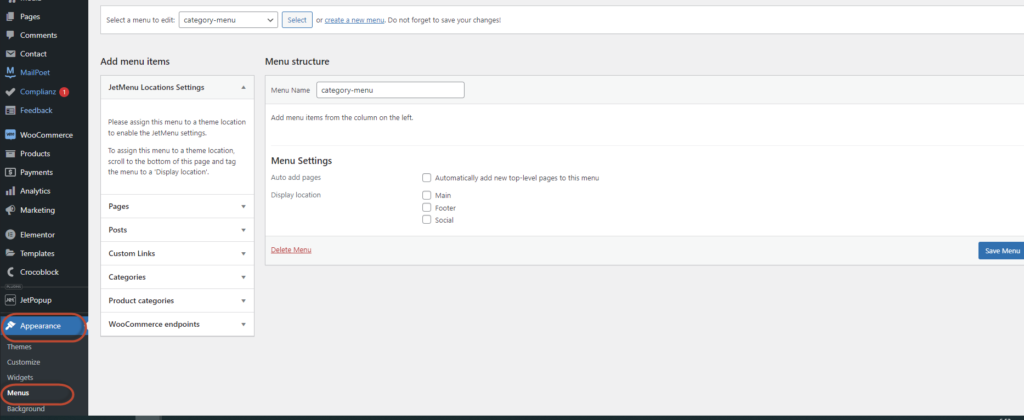

- Buat script pada file
functions.phpfilter hook dan buat fungsi untuk membuat objek menu.
//functions.php

add_filter( 'wp_get_nav_menu_items', array($this, 'set_custom_category_menu'), 10, 3);

public function set_custom_category_menu($items, $menu, $args){
   if( $menu->term_id != 68 ) return $items; // Where 68 is Menu ID, so the code won't affect other menus.
      // don't add child categories in administration of menus
   if (is_admin()){
      return $items;
   }

   //get top level product category, parent = 0
   $terms = get_terms( array('taxonomy' => 'product_cat', 'parent' => 0 ) );
   $ctr = 0;
   $menu_parent = $menu->term_id;
   foreach ($terms as $term) {
      $term_parent  =  $term->parent;
      $new_item = custom_category_menu( $term->name, get_term_link($term), $ctr, $menu_parent );
      $new_id = $new_item->ID;
      $ctr++;
      $items[] = $new_item;

      $terms_child = get_terms( array('taxonomy' => 'product_cat', 'parent'  => $term->term_id ) );
      if(!empty($terms_child)){
         foreach ($terms_child as $term_child){
            $new_child = custom_category_menu( $term_child->name, get_term_link($term_child), $ctr, $new_id );
            $new_id = $new_child->ID;
            $ctr++;
            $items[] = $new_child;

            //level 3
            $terms_child_child = get_terms( array('taxonomy' => 'product_cat', 'parent'  => $term_child->term_id ) );
            if(!empty($terms_child_child)){
               foreach ($terms_child_child as $term_child_child){
                  $new_child = custom_category_menu( $term_child_child->name, get_term_link($term_child_child), $ctr, $new_id );
                  $ctr++;
                  $items[] = $new_child;
               }
            }

         }
      }
   }

   return $items;
}

function custom_category_menu($title, $url, $order, $parent = 0){
   $item = new stdClass();
   $item->ID = 1000000 + $order + $parent;
   $item->db_id = $item->ID;
   $item->title = $title;
   $item->url = $url;
   $item->menu_order = $order;
   $item->menu_item_parent = $parent;
   $item->type = '';
   $item->object = '';
   $item->object_id = '';
   $item->classes = array();
   $item->target = '';
   $item->attr_title = '';
   $item->description = '';
   $item->xfn = '';
   $item->status = '';
   return $item;
}